Connecting towers in parallel
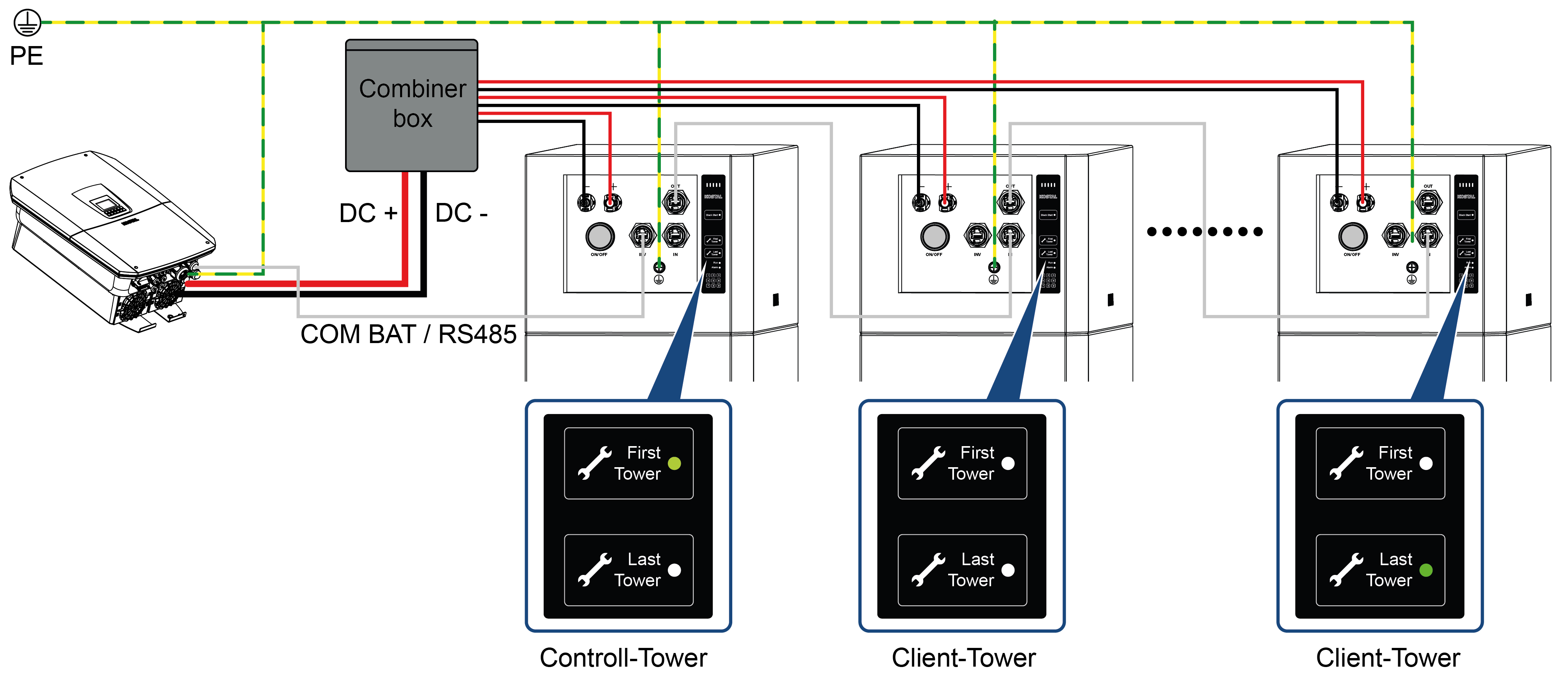
The system allows up to 8 towers to be operated in parallel (1 controller tower and 7 client towers). In order to connect several towers in parallel, please take the following steps:
- Ensure that the towers you wish to connect in parallel have the same number of modules. A parallel connection would fail if there is a disparity in voltage between the towers.
- Connect the PE cable of each tower to the PE busbar.
- Connect the towers with one another via the communication cable.
From the controller tower’s Out connection to the In connection to client 1, then from client 1’s Out connection to the In connection of the next client tower. - Connect the inverter to the controller tower via the communication cable, from the controller tower’s INV connection to the inverter.
- Connect the DC cables of all towers to the busbar (combiner box accessory) and then connect the busbar to the inverter.
- Switch on the line circuit breakers/break switches of all towers.
- Then press the On/Off button on the controller tower to start the entire system and check the status of each tower on the control panel.
Activating first tower and last tower
- On the first tower, the First Tower function is activated (LED on) and the Last Tower function is deactivated.
- On the last tower, the First Tower function is deactivated and the Last Tower function is activated (LED on).
- For all other towers, First Tower and Last Tower are deactivated.