Add the ENECTOR G2 wallbox
The ENECTOR G2 wallbox is connected to the KSEM G2 via the Device Manager and is then displayed under the Wallbox menu. No additional activation code is required for set-up.
INFO

Controlling the wallbox via the KOSTAL Smart Energy Meter G2 is only possible if all devices are controlled via the energy meter. Mixed control between the KOSTAL Smart Energy Meter G2 and control via the PLENTICORE G3 with MDC is not possible and will result in errors.
Please also refer to the document ‘Wiring and Setup of Multiple KOSTAL Inverters’.
To control the wallbox via the KOSTAL Smart Energy Meter G2 (KSEM G2), it must be added in the KSEM G2’s device manager.
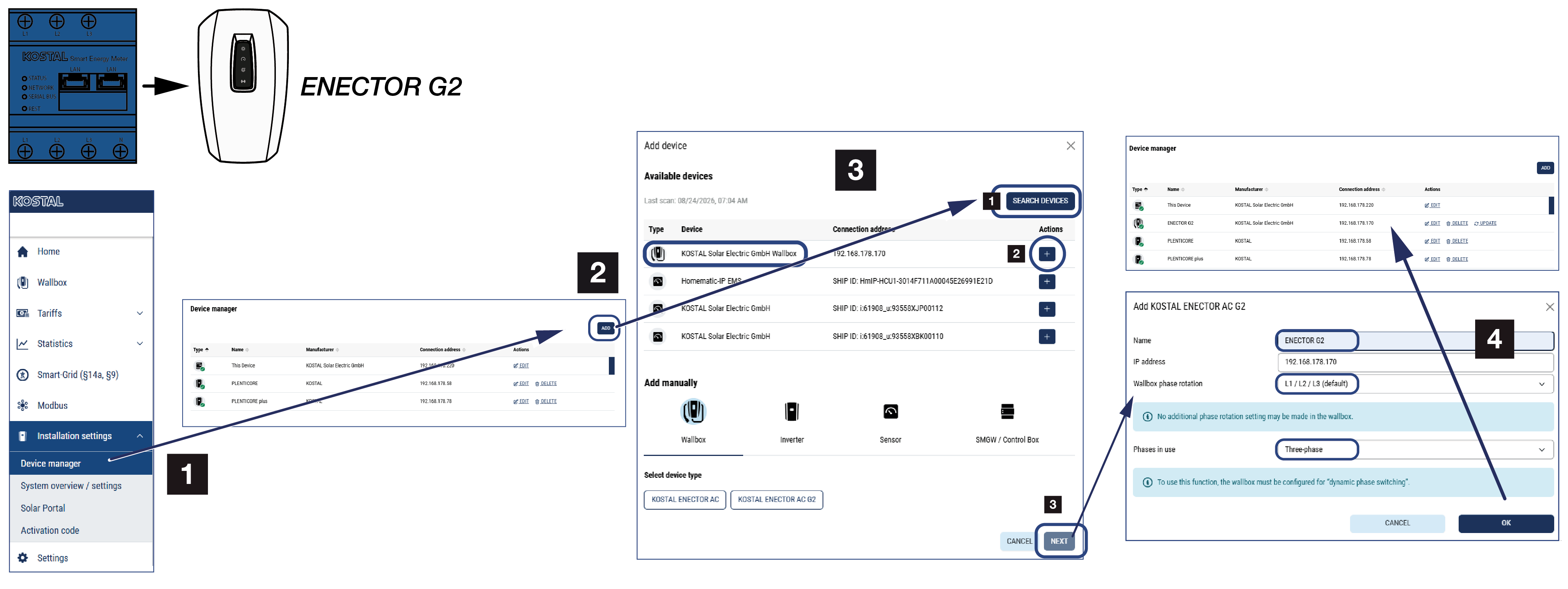
- Open the KSEM G2 web server.
- Select the menu item ‘System Control > Device Manager ’ and then ‘Add ’.
- Refresh the list using ‘Search for devices’.
- If the wallbox (KOSTAL Solar Electric GmbH Wallbox) is displayed, you can add it by clicking the plus sign.
If the wallbox is not displayed, it can be added manually to the system via Select device type > KOSTAL ENECTOR AC G2. - On the next screen, complete or check the fields and then click OK.
- Name: Name of the wallbox
- IP address: IP address of the wallbox
- Wallbox phase rotation: The selection of connected phases must match the phases actually connected to the device.
Important: Phase rotation must only be configured in one place. Either in the ENECTOR G2 under Settings > General > Phase sequence or in the KSEM G2. If the setting has already been configured in the ENECTOR G2, the phase rotation in the KSEM G2 must remain at the default setting L1/L2/L3. By default, however, the wallbox is supplied with the phase sequence L1/L2/L3.
- Phases used: Select three-phase or single-phase. - Close the window
- The wallbox is added to the system. You can configure the wallbox further via ‘Edit ’.
Check / change phase sequence
INFO
Phase imbalance / phase sequence of the wallbox
If there are several wallboxes or high-power consumers on the domestic network, it may be necessary to adjust the phase sequence of the wallbox to avoid an unbalanced load, in accordance with applicable guidelines (in Germany, this is 4.6 kW).
By default, the phase sequence is set to L1/L2/L3 in the wallbox and does not need to be changed if there is only one wallbox on the domestic network.
If the phase sequence needs to be changed to avoid an unbalanced load, the phase sequence can be adjusted under the menu: System Settings > Device Manager > Settings > Wallbox > Edit > Phase Rotation of the Wallbox. The selected phase sequence must correspond to the physical connection of the phases in the wallbox.