EEBus connections
In this section, you can establish, disconnect and manage EEBus connections to other devices.
INFO

Smart meter gateways may only be coupled with the KOSTAL Smart Energy Meter if they send data to the KOSTAL Smart Energy Meter. It is possible to couple other devices that are EEBus-compatible, but they are not controlled through the KOSTAL Smart Energy Meter. This can lead to error messages or malfunctions for the coupled devices.
EEBus devices on the same network are automatically detected and displayed under the ‘EEBus Connections’ section. Once an EEBus device has been found and you wish to establish a connection between the KOSTAL Smart Energy Meter and the EEBus device, you must manually confirm the connection – a process also known as pairing.
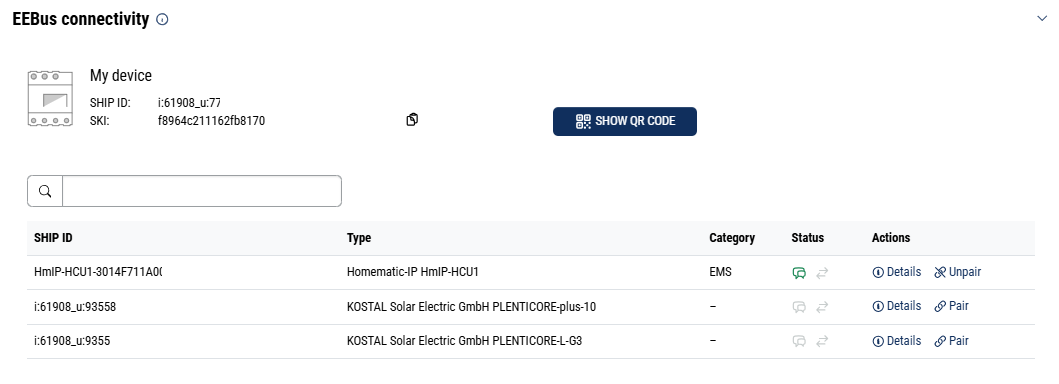
Under ‘My Device’, the name of the KOSTAL Smart Energy Meter and the SKI device identifier are displayed.
The SKI (Subject Key Identifier) is the unique identifier for your own EEBus device. This can be queried by other EEBus devices during the pairing process to identify the EEBus device. In this case, the SKI can be copied to the clipboard using the copy icon.
The table lists all available EEBus devices on the local network.
The icons can be used to view further details about the EEBus device and to carry out pairing actions.
The following properties are displayed for each available EEBus device:
Parameter | Explanation | |
|---|---|---|
SHIP ID | Host name of the EEBus device | |
Type | Display Device name | |
Category | Display Device type | |
Status |
| Not paired: The EEBus device has been detected but is not paired. |
| Paired: The EEBus device is paired. | |
| Not connected: There is currently no active connection. | |
| Connected: There is currently an active connection. | |
Action | View details and perform pairing actions. | |
| Details icon Clicking on the icon for an EEBus device opens a dialogue box displaying further details:
| |
| Pairing icon To connect EEBus devices to one another, both devices must first be paired. | |
| 'Unpair' icon The ‘Unpair’ action can be used to disconnect a connected and paired EEBus device. | |


