Access key
In order to grant an application access to the JSON (JavaScript Object Notation) interface or the web user interface of the KOSTAL Smart Energy Meter, the application must authenticate itself with the KOSTAL Smart Energy Meter.
Authorisation is carried out using an access key, which has been generated beforehand in the KOSTAL Smart Energy Meter.
Creating the access key
Access keys can be generated under the menu item Profiles > Access Keys.
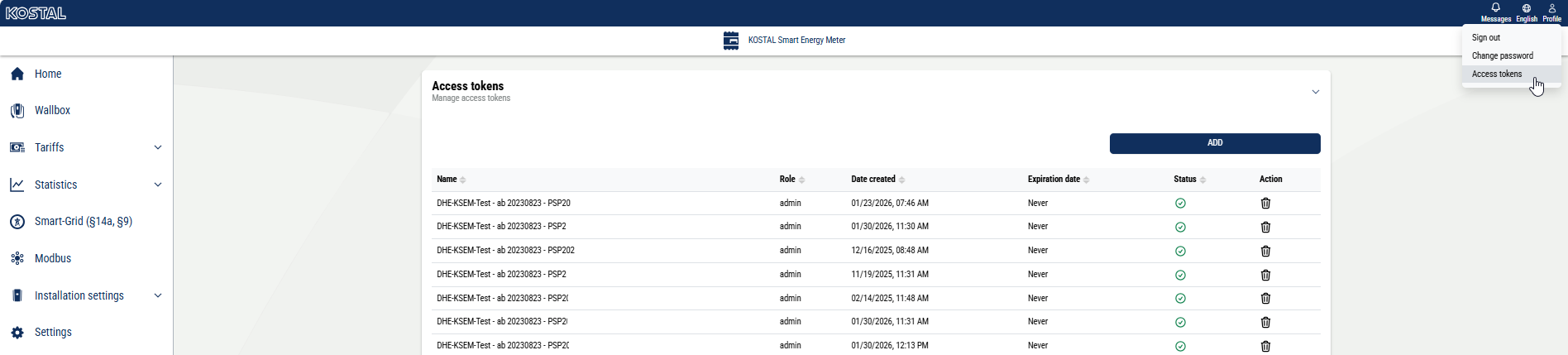
Clicking on ADD opens a window in which the name, role and expiry date of the access key can be specified.
Parameters | Explanation |
|---|---|
Name | Name of the user, application or device that is to use the interface. |
Role |
|
Expires on | the expiry date of the access key. |
Once created, the access key is displayed only once. It cannot be obtained or displayed again and should therefore be copied and stored securely upon receipt.

Authorisation of the access key
A newly issued access key must be authorised. Clicking on AUTHORISE authenticates the access key and authorises it for use with the JSON interface or the web user interface.
Deleting the access key
An access key can be deleted from the system by clicking on REVOKE.
Using the API access key
Once an API access key has been authenticated and authorised by the user, it can be used by the application for JSON interface requests.
To do this, the access key is transmitted as part of the HTTP header:
GET /api/json/<resource> HTTP/1.1
Host: <energy manager>
Content-Type: application/json
Authorization: Bearer eyJhbGciOiJSUzI1NiIsInR5cCI6IkpXVCJ9[..]
Using the admin access key
Once an admin access key has been authenticated and authorised by the user, it can be used by the application to display the web user interface.
To do this, the access key is sent as part of the HTTP header or must be stored in the browser’s local storage so that it can be read from there.
Access key TTL
The lifetime of an access key can be limited during the authentication request. To do this, an expiry date is defined in addition to the name of the application. Furthermore, an issued access key can be revoked by a logged-in user via the web interface. All subsequent requests made using a revoked access key will be rejected.