Connecting battery's DC cables
The battery’s DC cables must only be connected to the inverter when both the inverter and the battery storage system are de-energised.
DANGER
Risk of death due to electrical shock and discharge!
The battery’s DC cables may be energised.
- Be sure to de-energise the battery storage system. Please also observe the instructions in the operating manual provided by the battery manufacturer.
INFO

Use flexible, tinned cables with double insulation in accordance with EN 50618.
We recommend a cross-section of 10–16 mm². Observe the connector manufacturer’s specifications and the technical data of the inverter.
Please note the following points:
- Only battery storage units (manufacturers) approved by KOSTAL Solar Electric GmbH may be connected to the inverter.
- If using multiple batteries or a parallel connection, they must be of the same manufacturer, type and size.
- A maximum total of 68 A may be connected across all DC inputs combined. This can be distributed across the DC inputs, or a single battery with a maximum of 68 A can be connected to a single DC input.
Connecting the battery
- Switch the DC switch on the inverter to Off.
- Disconnect the battery storage system from the mains.
- Connect the plug to the positive cable and the socket to the negative cable in the correct manner. The inverter is equipped with connectors from PHOENIX CONTACT (SUNCLIX type). When installing, it is essential to observe the manufacturer’s current specifications (e.g. permissible tightening torque, etc.).
Information on the SUNCLIX installation instructions can be found at: www.phoenixcontact.com - When connecting the sockets and plugs to the battery’s DC cables, ensure the correct polarity!
- Connect the sockets and plugs of the battery’s DC cables to the inverter. Keep the sealing plugs from the connectors.
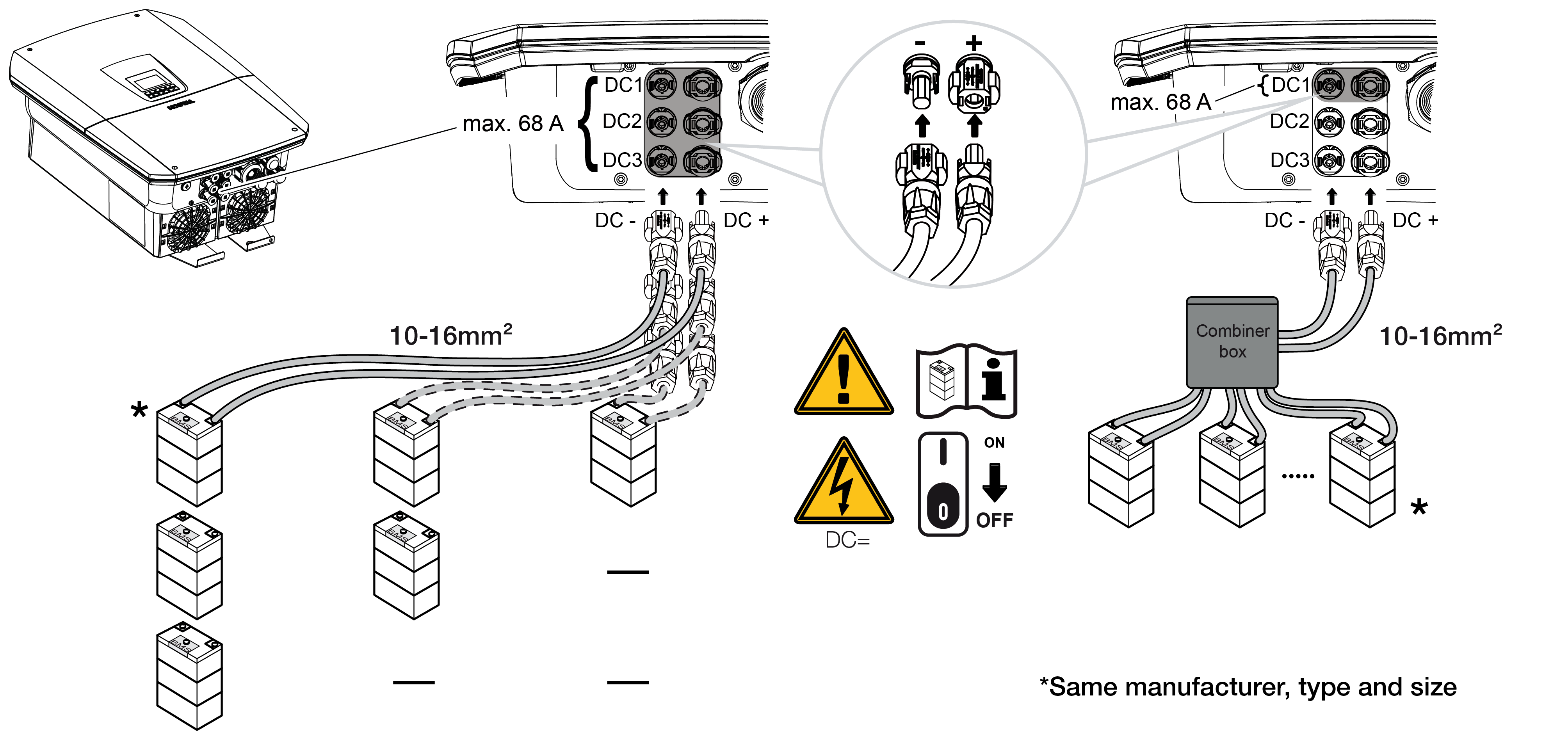
- The battery DC cables are connected.
The battery type and capacity are automatically determined during initial installation.
After initial commissioning, the data can be checked in the web server under the menu item ‘Battery settings’, and further battery configurations can be carried out.