System description
The PLENTICORE BI G3 is a three-phase battery inverter designed for use in three-phase grids.
Battery inverter
When the inverter is used as a battery inverter, batteries can be connected to the DC inputs. The batteries should be from the same manufacturer and of the same type and capacity.
The inverter with a connected battery storage system is used to store energy from energy suppliers (EZA) that has been generated within the domestic grid, e.g. via additional PV systems, combined heat and power units or small wind turbines. The stored energy can then be used for self-consumption within the domestic grid.
1 | Communication connection to inverter via LAN |
2 | Communication connection to inverter via WiFi/WLAN |
3 | Inverter |
4 | Battery system connection |
5 | Communication connection: Battery management system (BMS) via RS485 |
6 | Circuit breaker Inverter |
7 | Digital energy meter (Modbus RTU) at the grid connection point |
8 | Main fuse, house |
9 | Consumption and feed-in meter or smart meter (not available in all countries) |
10 | Public grid |
11 | Circuit breaker Electricity consumption |
12 | Electricity consumption |
13 | Feed-in meter AC energy supplier |
14 | Circuit breaker for AC energy supplier |
15 | AC power source, e.g. CHP unit, or other generation systems (EZA), e.g. PV inverter (the energy from the AC power source can be temporarily stored in the battery) |
Controlling inverters via Multi Device Control (MDC)
This function is available from PLENTICORE G3 SW 3.06.10 onwards.
Further information on configuration and wiring can be found in the supplementary document Wiring and setting up multiple KOSTAL inverters via MDC.
Multi Device Control (MDC) enables central monitoring and control of MDC-enabled inverters and other MDC-enabled devices within the same home network. The control function is performed by a PLENTICORE G3 inverter configured as an MDC host. The MDC host inverter can be operated both without a battery and with a connected battery. If a battery is used within the MDC system network, it must be connected to the MDC host inverter. The battery with the largest usable capacity must be connected to the MDC host.
If several PLENTICORE G3 inverters with batteries have been installed in the home network, these are controlled via an MDC host. To do this, the paid product extension / add-on option ‘Battery Control with MDC’ must be activated on the MDC host inverter. If several batteries have been installed in the MDC system network, the battery with the largest capacity must be connected to the MDC host inverter.
Without the ‘Battery Control with MDC’ product extension, only one battery can be connected to and controlled via the MDC host inverter.
Controlling and regulating other MDC client inverters is also possible without the product extension if only one battery storage unit is used in the MDC system.
An energy meter (KEM) can be used as the energy meter in this configuration. A KOSTAL Smart Energy Meter (KSEM) is not strictly necessary.
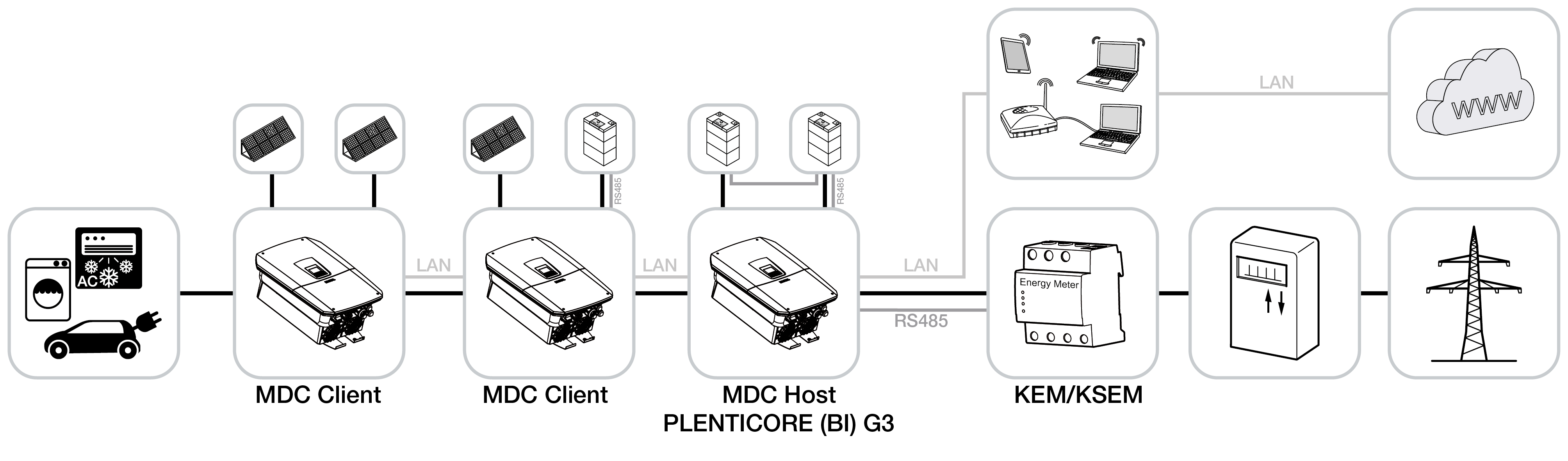
Inverters configured as MDC client inverters can be added via the device manager in the MDC host inverter. These devices are then displayed in the power flow diagram under ‘Instantaneous values’ on the MDC host inverter.
INFO

If non-MDC-capable devices are present in the same home network alongside MDC-capable devices and need to be controlled together, this can only be done via a KOSTAL Smart Energy Meter and not via an MDC host inverter.
This is the case, for example, if a PLENTICORE G3 and a PLENTICORE plus G1 or an ENECTOR wallbox with comfort function, which is controlled via Modbus RTU (RS485), have been installed in the home network.
Product extensions
Product extensions can be activated using activation codes. PLENTICOINs are required for this.
The PLENTICOIN is a single-purpose voucher for product extensions. The PLENTICOIN can be redeemed in the KOSTAL Solar webshop for the required activation code (e.g. battery extension). The PLENTICOIN is purchased via specialist wholesalers.
The following product extensions are available and can be accessed using the PLENTICOIN in the KOSTAL Solar webshop:
The product upgrades can then be activated using the KOSTAL Solar App, the inverter display or the inverter Webserver by going to Additional options and entering the activation code.
- Battery control with MDC
Enables the control of multiple batteries in a system network. A maximum of 3 inverters with batteries can be controlled via MDC. The product extension Battery control with MDC only needs to be activated on the MDC-HOST.