Backup switch connection (optional)
If a battery is connected to the inverter, the inverter provides the option of continuing to supply the house grid with energy using the PV and battery should the mains supply fail.
For this purpose, a manual or automatic backup box must be installed in the house grid at the grid connection point.
As a manual variant, KOSTAL provides the KOSTAL BackUp Switch (three-phase) and the KOSTAL BackUp Switch MP (single-phase), which disconnects the public grid from the house grid in backup mode.
Automatic backup boxes are offered as accessories by other suppliers.
You will find a list of approved KOSTAL Solar Electric accessories on our website in the download area for the product.
Connection of communication cable in the inverter for the KOSTAL BackUp Switch
System overview
The KOSTAL BackUp Switch is connected differently depending on the country and energy supplier. Ask your energy supplier which connection variant is required in your case.
Left: Star point formation required. Separation of the neutral conductor from the public grid by the KOSTAL BackUp Switch in backup mode.
Right: Neutral point formation not required. No separation of the neutral conductor from the public grid by the KOSTAL BackUp Switch in backup mode.
- System overview for three-phase grid: PLENTICORE G3 with KOSTAL BackUp Switch three-phase
1 | System overview - disconnection of neutral conductor, neutral point setup required |
2 | System overview - no disconnection of neutral conductor, neutral point setup not required |
3 | KOSTAL BackUp Switch, manual changeover equipment |
4 | Consumers in grid mode |
5 | Consumers in grid mode |
6 | Signal cable to the inverter |
INFO

The following requirements apply to the communication cable:
Conductor cross-section from 0.2 to 1.5mm2
Maximum length 30 m
Stripping length 8 mm
Please observe the specifications for conductor cross-sections in the manufacturer's instructions.
- Observe the instructions supplied with the KOSTAL BackUp Switch.
- Switch the DC switch on the inverter to Off.
- Disconnect the domestic power supply and secure it against being switched back on.
- Mount the KOSTAL BackUp Switch on the top-hat rail in the control cabinet or power distribution board.
- Lay the backup signal cable professionally from the inverter to the control cabinet and connect it to the KOSTAL BackUp Switch.
- Connect the backup signal cable to the terminal for the backup function (terminal X402) in the inverter.
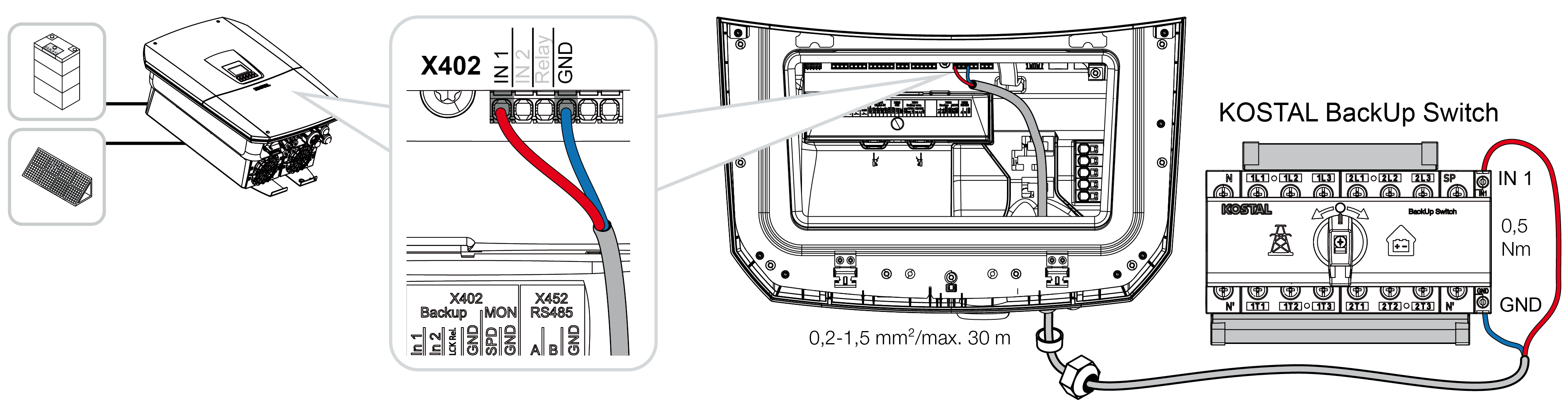
- The signal cable from the KOSTAL BackUp Switch is now connected.
The use of the KOSTAL BackUp Switch is selected during the initial installation of the inverter or can be selected via the web server under Service > General > Operating mode > Change operating mode.
Connection of communication cable in the inverter for the automatic backup box
System overview
The connection may vary depending on the country, grid connection, energy supplier and backup box manufacturer. Therefore, please follow the manufacturer's specifications for the backup box exactly.
1 | Backup box |
2 | Consumers in grid mode and backup mode |
3 | Consumers in grid mode |
INFO
The communication cable must meet the following requirements:
Conductor cross-section of 0.2 to 1.5mm2
Maximum length 30 m
Stripping length 8 mm
Please observe the specifications for conductor cross-sections in the manufacturer's instructions.
- Observe the instructions supplied with the backup box.
- Switch the DC switch on the inverter to Off.
- Disconnect the domestic power supply and secure it against being switched back on.
- Assemble and install the automatic backup box in the domestic power supply in accordance with the manufacturer's specifications.
- Lay the backup signal cable professionally from the inverter to the automatic backup box and connect it to the backup box according to the manufacturer's connection diagram.
- Connect the backup signal cable to the connection terminal for the backup box (terminal X402) in the inverter.
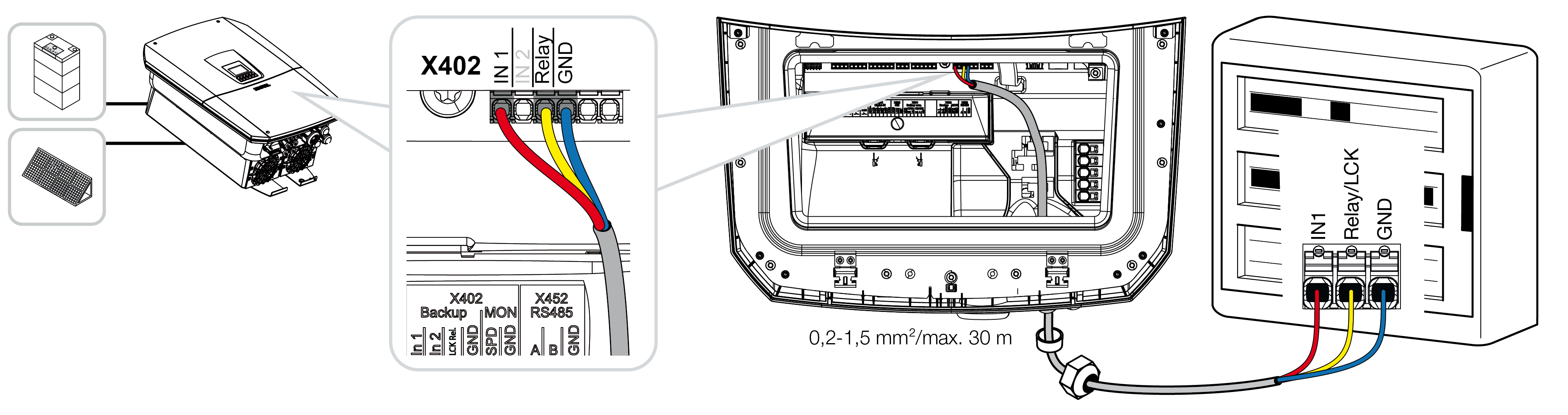
- The signal cable of the automatic backup box is now connected.
The use of the automatic backup box is selected during the initial installation of the inverter or can be selected via the web server under Service > General > Operating mode > Change operating mode.