Current values menu
Power flow diagram
The power flow diagram shows the energy flows of the PV system.
If MDC-compatible devices are present in the system and have been configured in the device manager of the MDC host inverter, these are displayed as a total in the power flow diagram.
Clicking on an individual icon displays details of the compatible devices connected to the MDC host inverter.
The power flow diagram is not available for MDC client inverters, as the total of all compatible MDC power ratings is displayed uniformly in the MDC host inverter.
MDC client devices are connected to the MDC host inverter via the device manager.
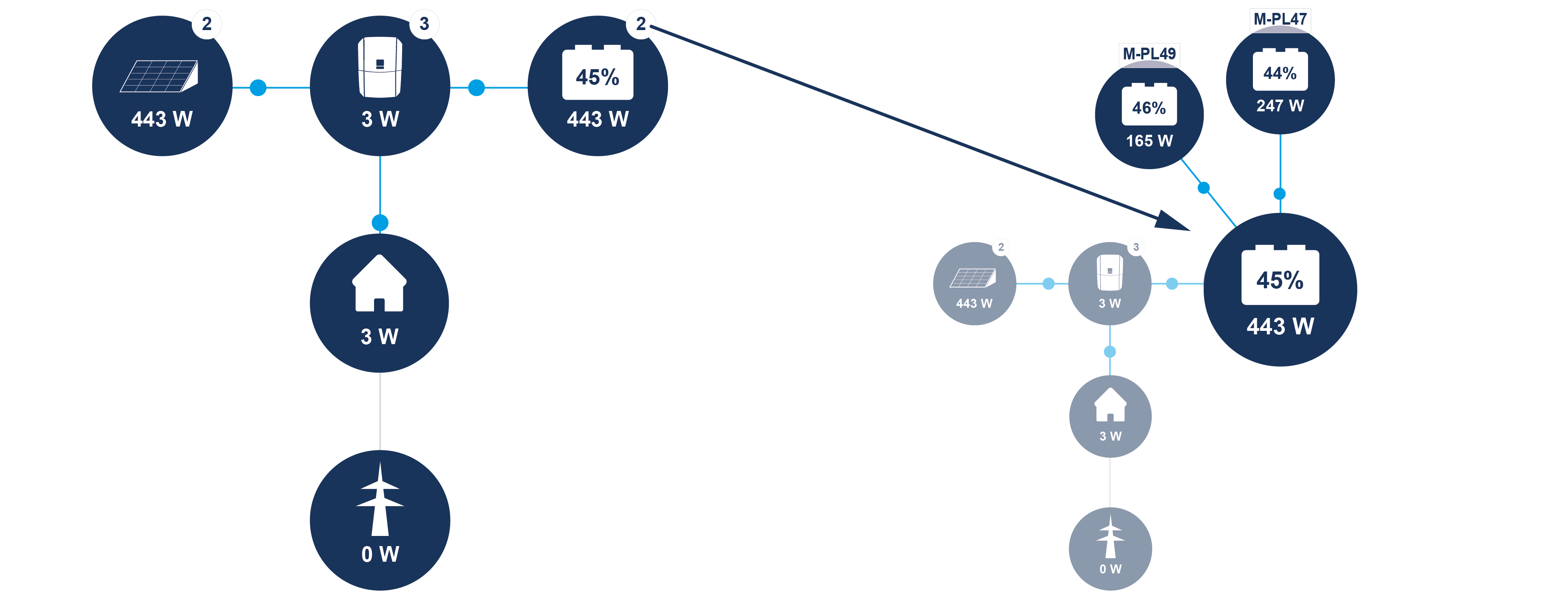
The user can view the current performance figures for the PV array (DC), the inverter, the battery, the loads and the grid. Detailed information can be viewed by expanding the relevant sections.
If other MDC Client devices are connected to the inverter, these are also displayed here.
PV generator
Display of the voltage, current and energy generated by the PV generators for each DC input.
Parameter | Explanation |
|---|---|
DC input x | Displays the voltage, current and power generated by the PV generators per DC input. |
Power | If the inverter has been configured as an MDC host, the power from other inverters connected to the MDC host via the device manager is displayed here. |
Inverter
Displays the current status of the inverter and the current power data for the grid side (AC), as well as how the energy is distributed across the phases.
Parameter | Explanation |
|---|---|
Status | Operating status of the inverter. For more information, visit Operational status (display) |
Digital inputs | Signal status of the connection terminal Digital interface for ripple control receivers (inputs 1–4). The display shows whether the feed-in, e.g. from the energy supplier or an external battery management system, is currently being limited. Settings, e.g. for user-defined active/reactive power reduction, can be made under Service > General > Digital inputs. Why active power control? |
Output power | Shows how much power the inverter is feeding into the domestic grid. |
Grid frequency | Shows the current grid frequency. |
Cos phi | Indicates the current power factor (cos phi). |
Power reduction to | Shows the current power curtailment setting. If an energy meter (e.g. a KOSTAL Smart Energy Meter) is installed in the home network and a power limit is set, the active power is dynamically limited taking into account the home consumption. This means that, in addition to the set power curtailment, the home consumption is added up to the maximum power limit of the inverter. |
Phase x | Displays the power values per phase (x = 1, 2 or 3) |
Output power | If the inverter has been configured as an MDC host, the output from other inverters connected to the MDC host via the device manager is displayed here. |
Battery
If a battery is connected to the inverter and the DC input has been released for it, the current battery values are displayed.
INFO

If all values are zero, the battery is in sleep mode. The status of the battery can be checked via Instantaneous values > Inverter.
Parameter | Explanation |
|---|---|
Status | Charging: The battery is being charged. Discharging: Energy is being drawn from the battery. |
Battery status | Normal Equalisation charge: Deep discharge protection: External battery control: Battery sleep mode: Service charge: |
Voltage | Displays the charging/discharging voltage of the battery. |
Current | Shows the charging/discharging current of the battery. |
Power | Shows the charging/discharging power of the battery. |
State of charge | Shows the state of charge of the battery in %. |
Charge cycles | Indicates the charge cycles of the battery. |
Consumers
Display of current household consumption and the sources from which household consumption is met.
Parameters | Explanation |
|---|---|
Household consumption | Displays current household consumption. |
Supplied by | Displays the source from which household consumption is currently being met. |
Grid
Shows the current performance data of the grid side (AC).
Parameter | Explanation |
|---|---|
Grid | Feed-in: PV energy is fed into the public grid. Consumption: Energy is purchased from the public grid to cover home consumption. |