Start screen
1 | Logged-in user |
2 | Log out of the web server. Change password. |
3 | Inverter status |
4 | Inverter menus |
5 | Inverter menus for experts and installers |
6 | Power flow diagram |
INFO

Once you have logged in as plant owner or installer, you can choose from different menu items. Different menus can be used, depending on the user role.
The menu items described here may differ depending on the software version in use.
INFO
If the inverter has been configured as an MDC client, the MDC host inverter can be accessed via the link ‘This device is controlled by another inverter ’.
Via the web server, the user can view the most important information, current values, events and version status of the inverter.
Webserver menus in the top bar
The following menus are available to the user in the top menu line in the Webserver.
- Notifications/events
You can access all notifications and events present in the inverter via the bell symbol in the uppermost menu line. If there are any new messages, this is indicated by a red dot next to the bell symbol. By clicking on an event message, you can access more information about the event. - Language setting
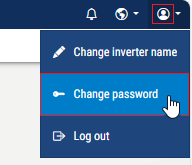
Here you can select the language in which you want to display the menus. - Personal area
- Change inverter name: You can use this menu item to change the inverter name. The name may be 1-63 characters long and contain letters, numerals or "-". The inverter name must not start with "-".
- Change password: Once you have logged into the inverter, you can change the password by going to the Webserver menu item in the uppermost line. The password must comprise at least 8 characters and include the following characters: lower-case letters (a-z), upper-case letters (A-Z), numbers (0-9) and special characters.
- Log out:
You can use this menu item to log out of the Webserver.
Web server menus in the sidebar
The following menus are available to users on the web server:
-
real-time values:Power flow diagram and display of current power values for PV, the inverter, the battery, loads and the grid. Detailed information can be viewed by expanding the relevant sections. If other MDC client devices are connected to the MDC host inverter, their power values are also displayed here. The power flow diagram is not displayed for MDC client inverters. - Battery
These menu items can be used to display information about the inverter battery or to configure the battery. Some menu items can only be configured by the installer using a service code. - Statistics
Shows information about the inverter's yield data for daily, monthly, annual or total time periods. - Device Manager
If the inverter has been configured as a Multi Device Control host (MDC host), the Device Manager menu is displayed. This menu item can be used to add and manage all devices that are located in the same network as the MDC host inverter and are to be controlled by it. Multi Device Control (MDC) can be used to control and visualise compatible devices that are present in the same system. These can be inverters, batteries and other devices. For example, the battery charge of other KOSTAL inverters or the power limitation at the grid connection point can be controlled. All inverters set up here are then displayed in the power flow diagram. - Log data
Here the inverter's log data can be downloaded in full or for a limited time period. - Settings
These menu items can be used to configure the basic settings for the inverter (e.g. inverter name, network settings, specifications relating to remuneration, retrieval of log data). - Update
This menu item can be used to update the inverter via a software update and to configure the system update method, e.g. with automatic updates. - Info
On the Info page, the user can view events pending in the inverter and the inverter's installed versions (e.g. software, MC, IOC, hardware). This information can also be viewed without logging in to the Webserver. - Service - General
These menu items can be used by the installer to configure the hardware of the inverter (e.g. active power reduction or activation of additional options). Some menu items can also be configured by the system operator without a service code (e.g. active power limitation, shadow management). - Service - Grid parameterisation
Using these menu items, the inverter parameters can be configured by the installer, e.g. reactive power or special grid settings that have been specified by the energy supplier. - System analysis
Under the System Analysis menu item, you will find an overview of the tests and events performed during inverter commissioning or inverter start-up.