Charging mode – Settings
Settings can be configured for the following charging modes.
- Power Mode
- Solar Plus Mode
- Time Mode
No settings can be adjusted for the following charging modes.
- Lock Mode
- Solar Pure Mode
Power Mode (Simple Charging)
Set the maximum charging power in Power Mode here and save it. The settings will then be used during charging.
For vehicles that can only be charged using single-phase power, the charging power can be set between 1.4 kW and 3.7 kW.
For vehicles that can be charged using three-phase power, the charging power can be set from 4.3 kW to 11 kW.
Solar Plus Mode (Solar-optimised charging)
Set a minimum charging power (start-up charging power) and a minimum surplus from solar generation (PV surplus) here to start charging.
Should the PV surplus increase, grid consumption and, where applicable, the charging power are automatically adjusted to match the higher PV surplus.
Solar-optimised charging is only possible in conjunction with a PV system. The PV system supplies the energy required to charge the electric vehicle.
Should the PV surplus power fall below the defined minimum solar surplus, charging is stopped again.
The values below the diagram show the settings in kW for single-phase or three-phase vehicles.
Min. solar surplus: The slider can be used to set the ratio between PV surplus and grid draw relative to the set minimum charging power.
Example: If a minimum solar surplus of 2.9 kW has been set, with a minimum charging power of 5.5 kW for three-phase vehicles, a minimum solar surplus of 2.9 kW must be available before the charging process begins. The remaining 2.6 kW is drawn from the grid. If the solar contribution increases, the amount drawn from the grid is reduced. The set and required values are displayed below the diagram.
Max. power consumption: Displays the energy drawn from the grid at the set minimum charging power.
Min. charging power: Sets the minimum charging power. The vehicle is charged at this minimum set charging power when the set PV surplus is available.
Time Mode (Time-controlled charging)
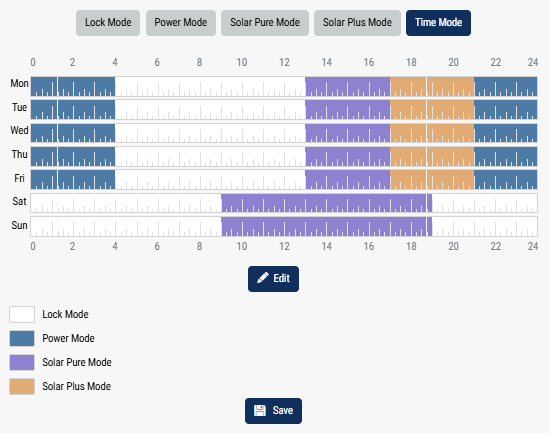
In this mode, you can specify at what time on which day of the week one of the available modes should be used.
For example, the wallbox can be locked (Lock Mode) whilst you are generally away (e.g. 8 am to 12 noon) and switched to solar charging (Solar Pure Mode) during the scheduled times when you are at home.
If the car is to be charged at night at a lower power level (Solar Plus Mode) or at full charging power (Power Mode), this can also be scheduled.
INFO

Whilst Time Mode is active, the button is disabled to prevent scheduled lockout periods from being overridden.
Configure Time Mode
- To edit Time Mode, click on Edit.
- The Time Mode window opens.
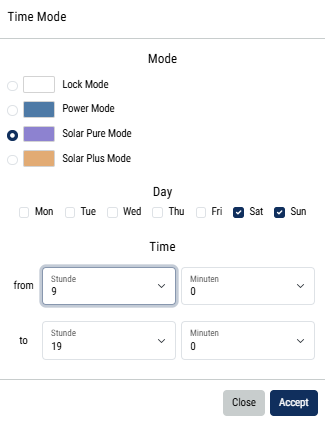
- Select a mode.
- Select one or more days at the same time to which the settings should apply.
- Then select the times at which this mode should apply, e.g. 9 am and 7 pm.
INFO
If you use Power Mode or Solar Plus Mode here, the charging settings you have configured in those modes will be applied.
- You can then apply this configuration to the selected day, to additional days, or to all days.
- To apply the configuration, press ‘Apply’.
- Time Mode has now been set up for the selected period.
Further days or times can be configured in the same way. Existing times can be edited or deleted by clicking on the relevant field.
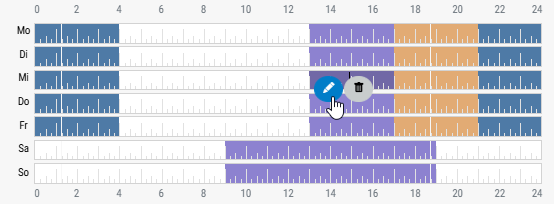
Time Mode is enabled when the Time Mode icon has been selected. As soon as you select a different mode, Time Mode is disabled.