Using the inverter as a WLAN bridge
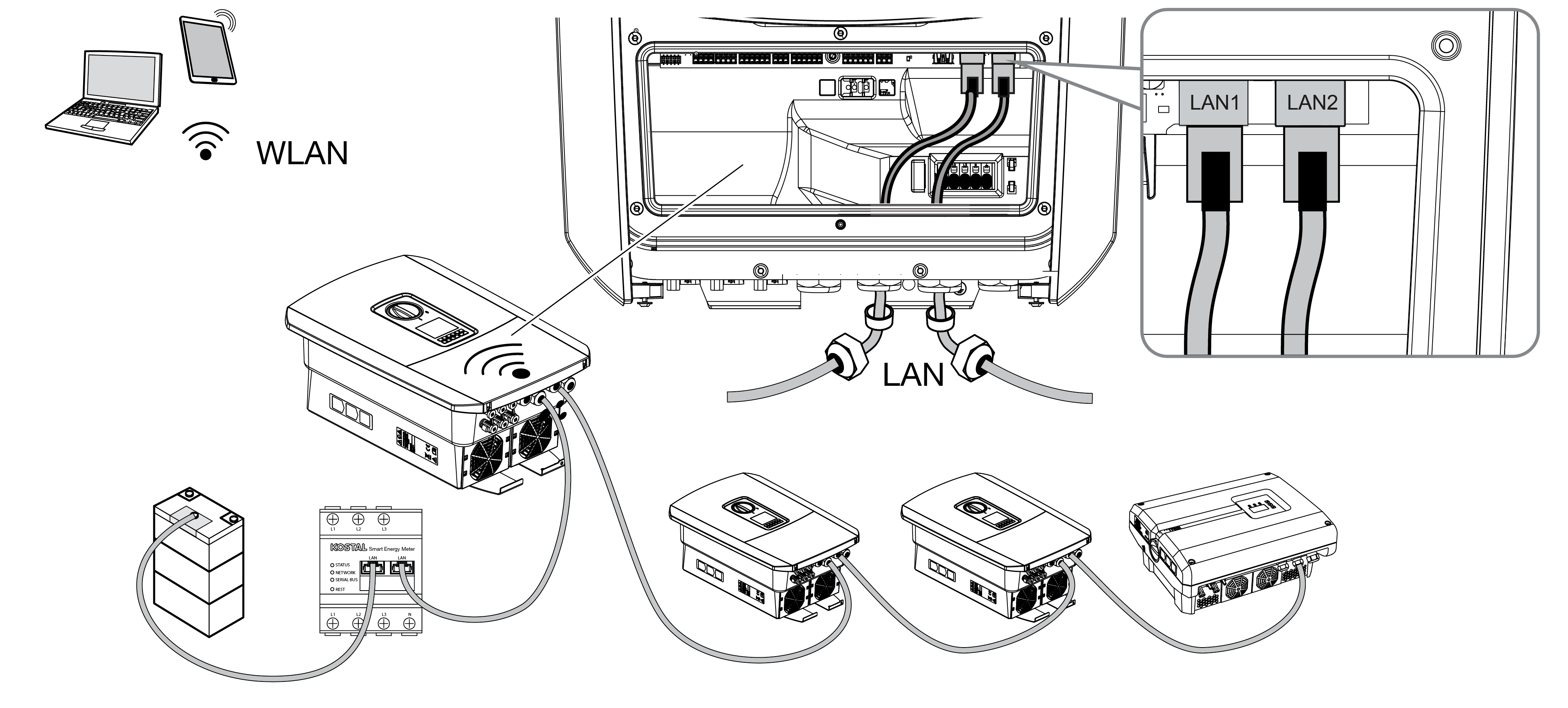
If there are several KOSTAL inverters in a system, the inverter can be used as a WLAN bridge.
Additional inverters, energy meters or battery storage systems can be connected to this inverter via LAN cable to establish a connection to the local home network and the Internet.
INFO

WLAN bridge cannot be activated
The WLAN bridge can only be activated if no other DHCP server is detected in the network. All other devices may only be connected to the inverter via a LAN connection.
This means that no device that is connected to another router/gateway via LAN and obtains its network data from another DHCP server may be connected to the inverter that is to be used as a WLAN bridge.
INFO
Automatic IP address allocation not possible
With some router models, the automatic IP address allocation will not work for devices connected downstream of the inverter bridge. If the IP address allocation function is not working, set a static IP address in the router for the devices connected downstream of the inverter bridge.
Connecting additional devices to the WLAN bridge
DANGER
Risk of death due to electrical shock and discharge!
- De-energise device and secure against being switched on again.
INFO
A Category 5 Ethernet cable (Cat 5e, FTP) or better with a max. length of 100 m is required to connect other devices.
- Switch the DC switch on the inverter to Off.
- Disconnect the inverter from the power supply and secure it against being switched back on.
- Guide the Ethernet cable into the inverter.
- Seal with sealing ring and union nut. Tighten union nut to the prescribed torque. Tightening torque: 8 Nm (M25).
- Connect the Ethernet cable to the LAN interface of the external device, e.g. inverter, energy meter or battery.
- Connect additional devices via an Ethernet cable.
- The external devices are now connected. The WLAN interface in the inverter must still be configured after initial commissioning.