Device network control via MDC
Please note:
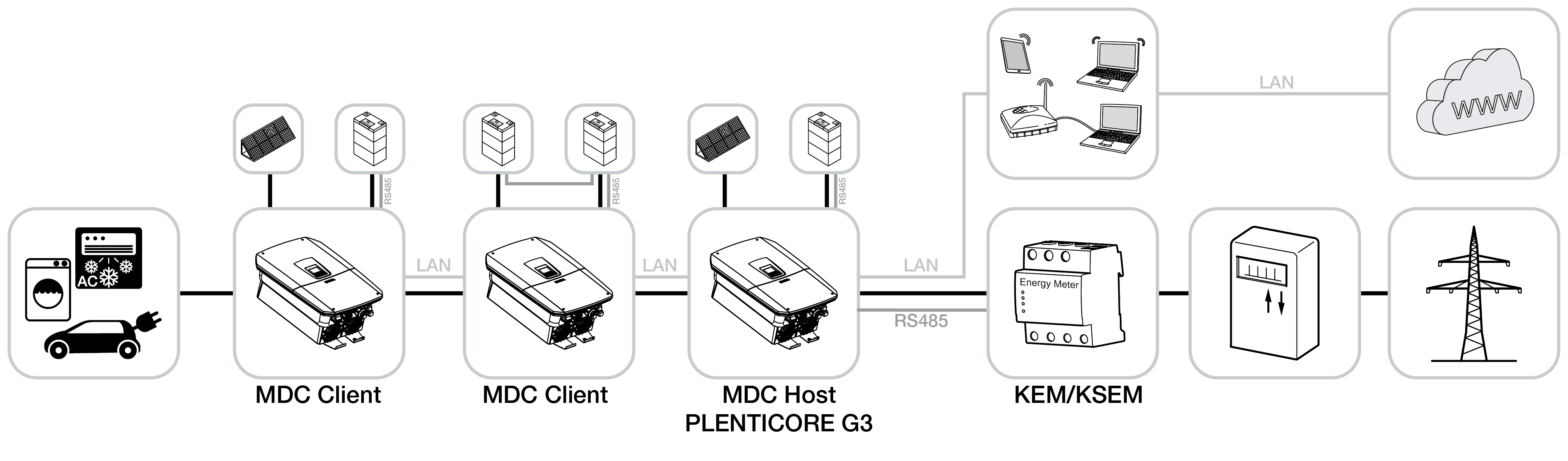
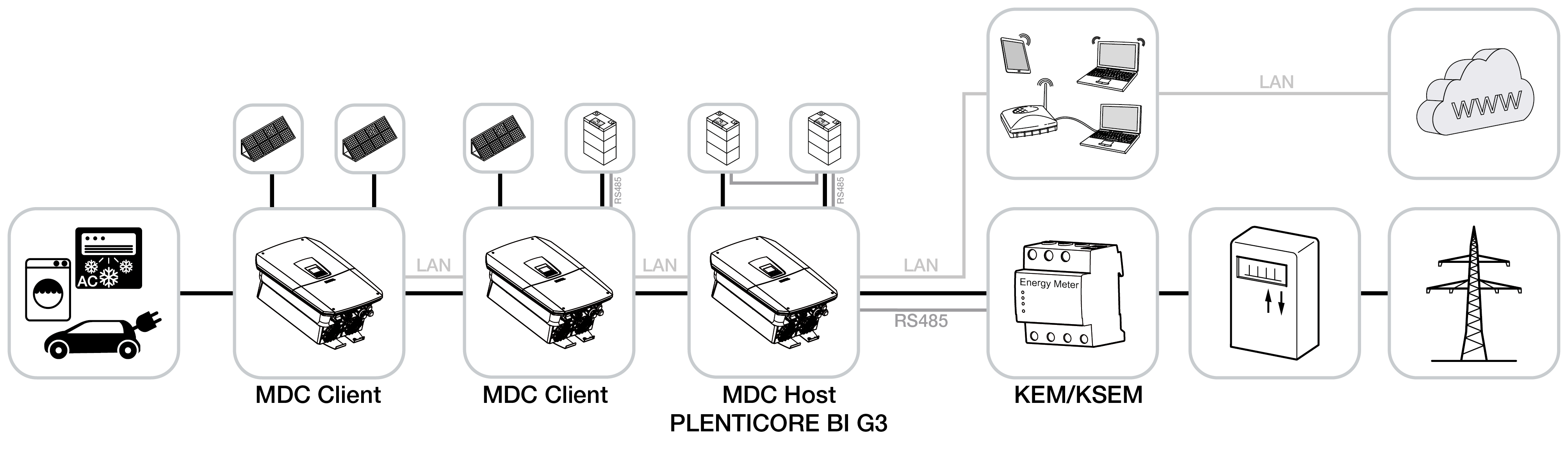
- A G3 inverter must be configured as the MDC host during initial setup. An MDC host inverter can be operated with or without a battery. If a battery is used in the system network, the battery with the largest capacity must be connected to the MDC host inverter.
- A maximum of one inverter with a connected battery may be used in the device network if the paid product extension ‘Battery Control with MDC’ has not been activated.
- A maximum of 3 inverters with connected batteries may be used in the system. In this case, the paid product extension ‘Battery Control with MDC’ must be purchased and activated.
- A maximum of 5 MDC-compatible inverters can be combined in the system network. These may include, for example, inverters from the PIKO CI or PLENTICORE G3 series.
- Only the devices listed in the table are approved for use with an MDC system.
- A KEM or KSEM must be connected to and configured on the MDC host inverter.
- The energy meter must be installed at the grid connection point.
- Inverters must no longer be configured within the KSEM. This is done exclusively via the device manager of the MDC host inverter.
- Control via the KSEM or any other external energy management system is not possible.
- Power monitoring or dynamic limitation of the feed-in power (e.g. to 60 per cent) at the grid connection point is configured only in the MDC host for all inverters.
- The power flow diagram for the entire system is clearly displayed only on the web server and on the display of the MDC Host inverter. The MDC Client inverters display only the instantaneous values for the respective MDC Client inverter.
- All inverters must be configured to send their data to the KOSTAL Solar Portal. If an MDC Host is used and a KOSTAL Smart Energy Meter (KSEM) is also installed as an energy meter at the grid connection point, the KSEM does not need to send its data to the KOSTAL Solar Portal.
Device network with MDC
The following KOSTAL devices can be used in a device network and are controlled via an MDC host.
- PLENTICORE G3 with battery
- PLENTICORE G3 without battery
- PLENTICORE MP G3
- PLENTICORE BI G3
- PIKO CI 30/50/60
- PIKO CI 30/50 G2
- PIKO CI 100
Additional products compatible with MDC (1)
The following energy meters can be used to visualise connected loads or generators in the energy flow diagram. The products are connected to the MDC host via the Device Manager.
INFO

Number of products in the device network
(1) Currently, a maximum of 1 Shelly or TQ-Systems meter can be added to the device network.
- Schelly products from Gen2/Gen3 onwards, connected via LAN/Wi-Fi:
- 3EM
- Pro 3EM
- Pro EM-50
- Plug S Gen3
- Plug M Gen 3
- KOSTAL Smart Energy Meter as a separate energy meter for appliances
- TQ-Systems energy meters:
- MU103
- SU100
- EM410
Device network with MDC control and without the ‘Battery control with MDC’ product extension
The MDC function is integrated as standard in the PLENTICORE G3 series inverters. This enables the control of additional MDC client inverters and other MDC-compatible devices.
In this device network, a maximum of 1 inverter with a connected battery may be used.
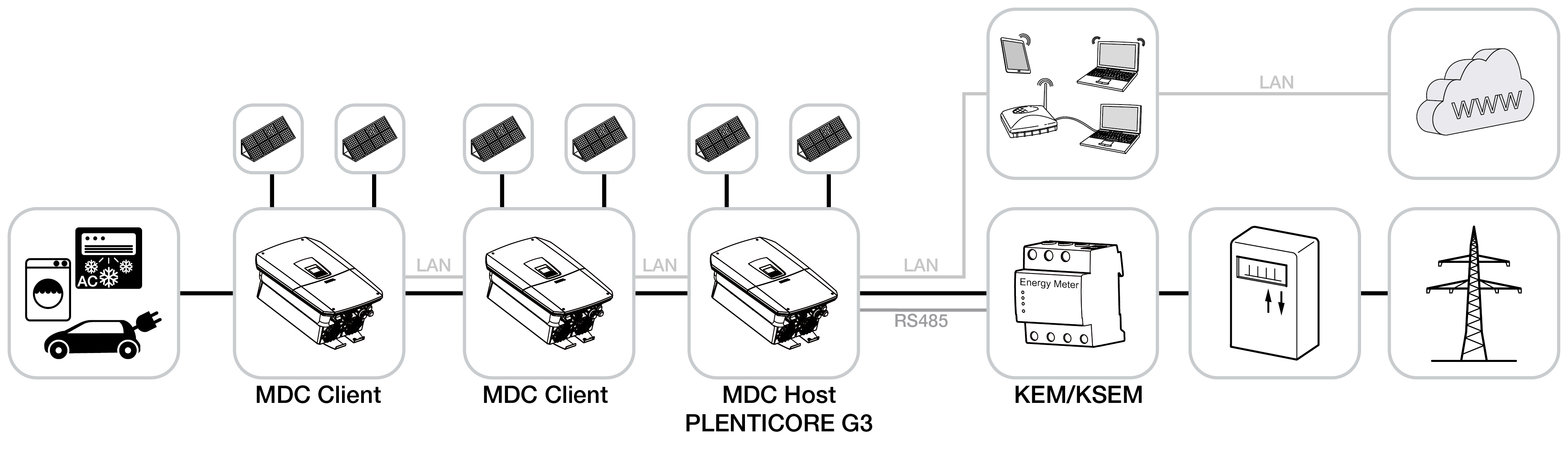
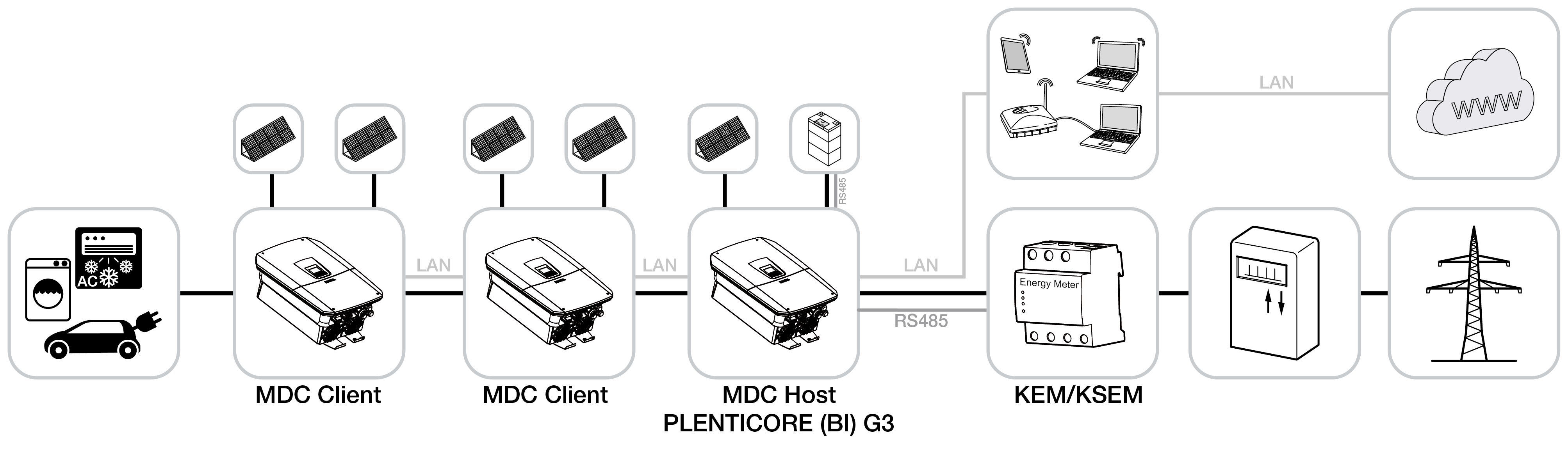
- MDC device network with PV inverters
This device network consists solely of PV inverters. There is no inverter with a connected battery in the device network. - Device network with PV and hybrid inverters
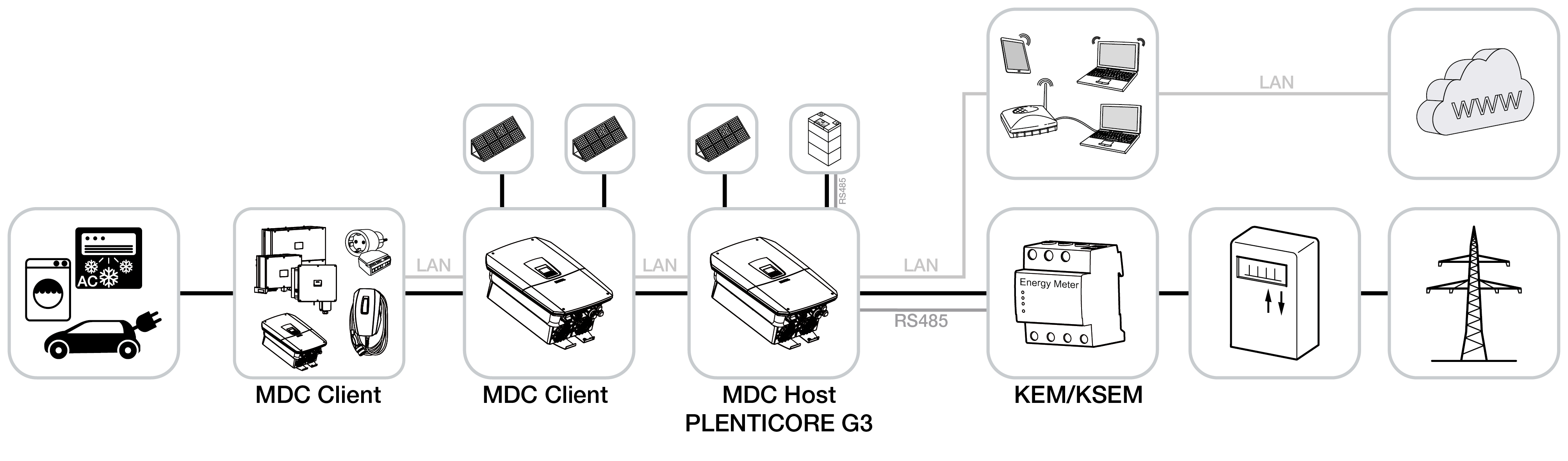
This device network consists of a hybrid or battery inverter with a connected battery and additional PV inverters. Only one inverter with a connected battery may be present in the device network. - Device network with additional MDC clients
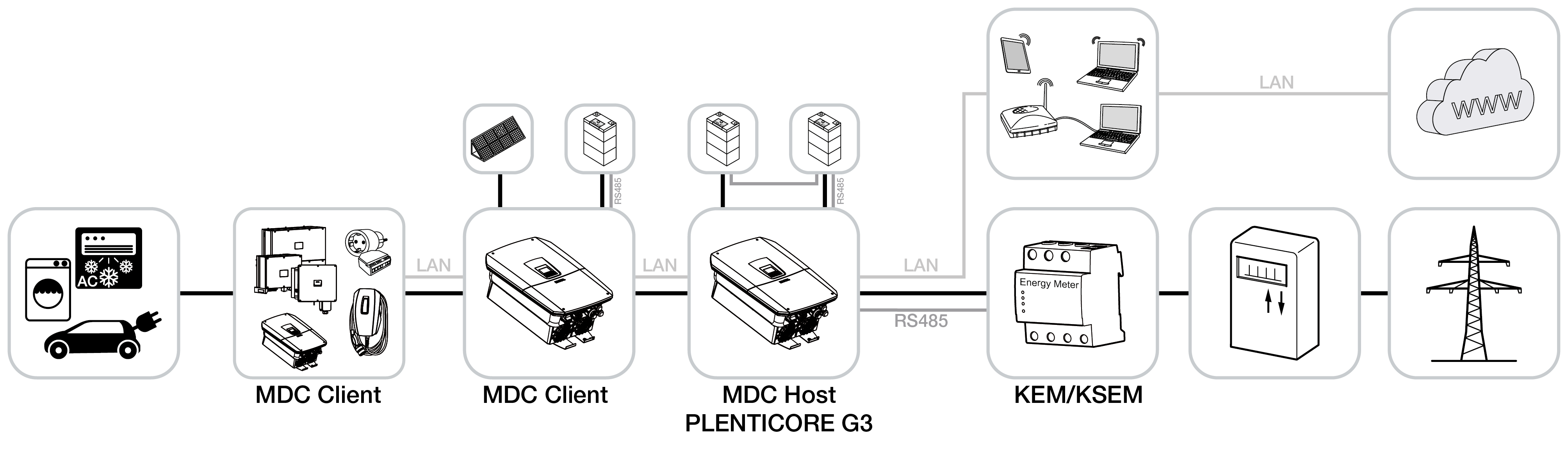
This device network is intended to illustrate that, in addition to the variants shown above, further compatible MDC-enabled devices can be connected to an MDC host within the device network. These may be additional PV inverters (e.g. PIKO CI) or external products. An overview can be found in the table of compatible products.
Device network with MDC control and the ‘Battery control with MDC’ product extension
In this device network, the paid product extension ‘Battery Control with MDC’ is additionally installed on a G3 inverter that has been configured as an MDC host. The battery function must be enabled on all inverters to which a battery is connected.
A maximum of 3 inverters with connected batteries may be used in this system configuration.
In this configuration, the inverter with the largest battery must be the MDC host. In this case, the MDC host can control up to two additional PLENTICORE G3 inverters with connected batteries.
Additional MDC clients (e.g. PIKO CI or PLENTICORE G3 PV inverters) can also be integrated.
- System configuration with hybrid inverters and a maximum of 3 batteries
Illustration showing 3 hybrid battery inverters with a connected battery. Additional PV inverters may also be present in the system configuration. - System configuration with PV and hybrid inverters with 2 batteries
Illustration showing 2 hybrid battery inverters with a connected battery. Additional PV inverters may also be present in the system configuration. - System configuration with PV and hybrid inverters, batteries and additional MDC clients
Illustration showing 1 battery inverter, 1 hybrid inverter with a connected battery, and further PV inverters (PIKO CI or PLENTICORE G3) connected as MDC client devices. Other compatible MDC-enabled devices within the network can be connected to the MDC host and, in some cases, controlled (e.g. inverters/wallboxes). An overview can be found in the table of compatible products.