Setting up MDC clients in the MDC host
MDC client devices (e.g. inverters, Schelly products or other MDC clients) are integrated via the device manager of the MDC host inverter.
See the list at Multi Device Control (MDC) compatibility for further details.
The device manager is only displayed on the inverter that has been configured as the MDC host inverter. The decision as to whether an inverter is operated as an MDC host or MDC client inverter is made during initial commissioning. Alternatively, the setting can be changed later via the Change operating mode menu item.
INFO

PIKO CI as an MDC client
With PIKO CI inverters, no specific configuration is required when setting them up as MDC clients. These can be configured as usual.
Under the ‘Device Manager’ menu item, you will see all available devices that have been detected on the home network by the MDC host.
INFO
Duplicate control/regulation must be avoided
If control via Multi Device Control is enabled, control via the KOSTAL Smart Energy Meter (KSEM) is no longer possible. All devices that were previously controlled via the KSEM must be removed from the KSEM under the ‘Inverters’ menu item and connected to the MDC host via the Device Manager. Any active power limitation in the KSEM must be deactivated and reconfigured in the MDC host.
If there are incompatible devices on the home network that can only be controlled via the KSEM (e.g. PLENTICORE plus G1), MDC cannot be used for control. In this case, all devices must be configured in the KSEM.
There are two ways to connect devices to the MDC host.
- Manual connection by entering all values
- Select a device from the list and connect it
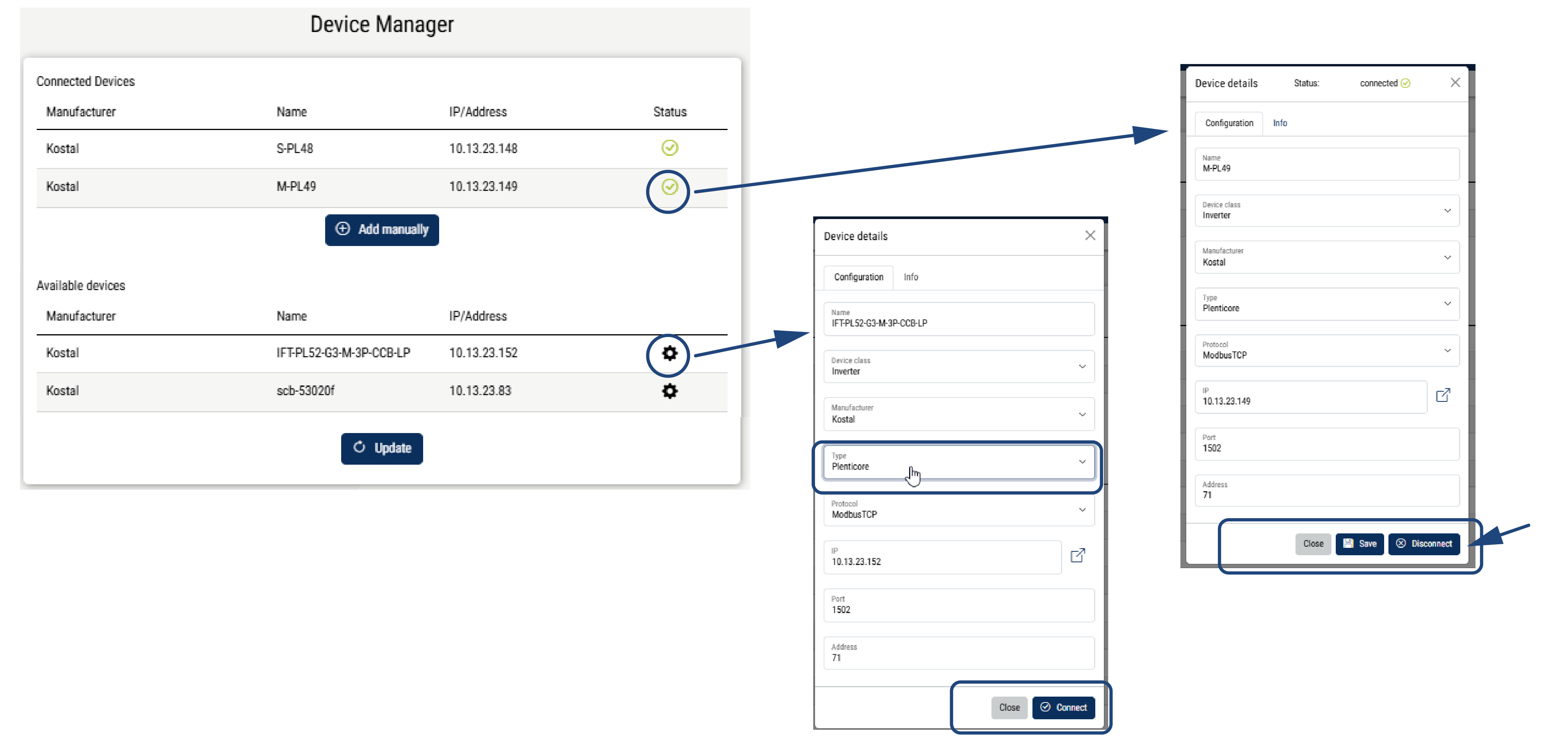
Use the ‘Add manually’ option to connect the devices to the MDC Host inverter. You will need to enter the device’s values manually. Depending on the device, it can then either be read only or also controlled.
If you select a device from the ‘Available Devices’ list, you can connect it to the MDC Host inverter once you have completed the necessary fields.
|
Parameter |
Explanation |
|---|---|
Connected devices | Displays all devices connected to the MDC host. Manufacturer: Display of the device manufacturer Name: Device name IP Address: IP address of the device Status: A green tick indicates that the device is connected. A red X means that the connection cannot be established or that an error has occurred. Clicking on the device opens the settings, which can be adjusted. Selecting ‘Disconnect’ disconnects the device from the MDC host, and the device can no longer be controlled by the MDC host. Under ‘Info’, you can view the current performance metrics for the device. Add manually: Use this button to connect devices for which you wish to enter the data manually or which are not listed in the list of automatically detected devices. |
Available devices | Displays all compatible devices found on the home network by the MDC host inverter. Clicking the ‘Refresh’ button allows you to scan the home network for new devices. Manufacturer: Display of the device manufacturer Name: Device name IP address: IP address of the device Settings (cogwheel): Use this option to connect the device to the MDC host. To do this, fill in all the fields. The device is then connected to the MDC host via Connect. |