Initial commissioning via display
The initial commissioning is carried out via the inverter display. The data is entered directly on the inverter.
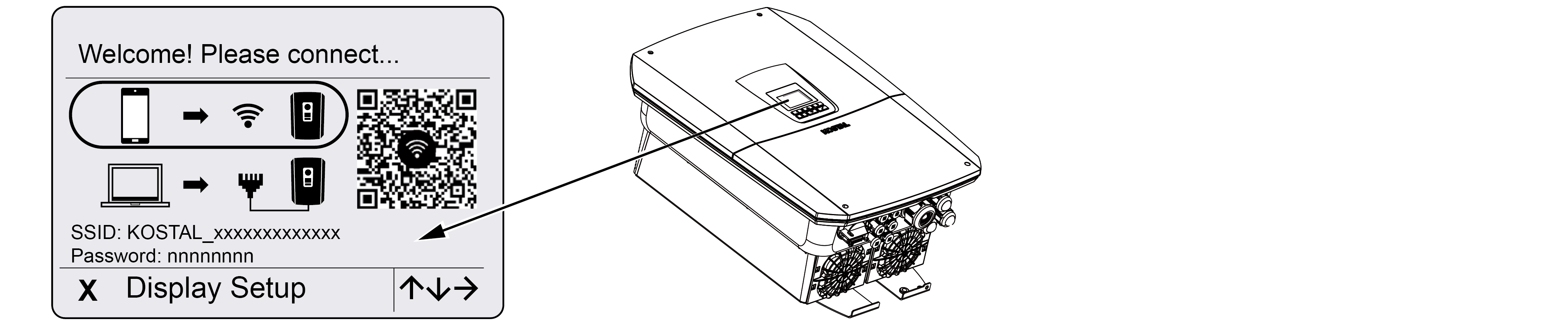
- Press X on the inverter to start the installation via the display.
- The Language menu is displayed.
- Select the language using the arrow keys and confirm with ENTER.
- Press the right arrow key to go to the next installation item.
- The Additional Options menu appears on the display.
INFO

This item can be used to enable options by entering an activation code in the inverter. The activation code, e.g. for connecting a battery to DC input 3 on the inverter, can be purchased from our online shop.
INFO
The currently enabled additional options are displayed under Enabled Options.
- Select‘Unlock option’ and confirm with ENTER.
- Enter the code you previously purchased from KOSTAL Solar Webshop.
- Finally, confirm your entry with √.
- Press the right arrow key to call up the next installation point.
- The Multi Device Control menu is displayed.
- Under Multi Device Control, select how the inverter should be configured. The following selection will then be taken into account during the initial installation.
Further information can be found in the chapter Multi Device Control.
As MDC host: The inverter can control other inverters that are connected to it via LAN cable. A battery should be connected to the inverter. If no battery is connected to the MDC host inverter, no battery can be connected to any other MDC client inverter. If there are several MDC inverters with connected battery systems in the system, the additional option Battery Control with MDC must be activated on the MDC host inverter.
As MDC client: The inverter is controlled via an MDC host inverter. A battery connected to the MDC client inverter is controlled via the MDC host inverter. To do this, the additional option Battery control with MDC must be activated on the MDC host inverter.
No MDC: The inverter as a stand-alone device cannot control any other inverters and is not connected to any other inverters. This selection must be made if no other devices are to be controlled via the inverter or if other devices (e.g. G1 inverter / wallbox) are controlled via a KSEM.
- Press the right arrow key to call up the next installation point.
- The System Components menu is displayed.
- Select the components to be included in the initial setup (PV generators, installed energy meter, connected battery, a KOSTAL BackUp Switch or an automatic backup box).
To do this, select the items using the arrow keys and confirm with ENTER.
The items will then be included in the initial installation. - At the end of the selection, use the arrow keys to go to Confirm and confirm with ENTER.
INFO
Depending on the selection of system components, some menu items may be added or omitted.
- Press the right arrow key to go to the next installation item.
- The Date and Time menu is displayed.
- Select the time zone and set the date and time, or have them determined automatically, and confirm with ENTER.
INFO
Entering the date and time ensures that the downloaded log data is timestamped correctly.
- Press the right arrow key to go to the next installation item.
- The Power Supply menu is displayed.
- Use the arrow keys to select the relevant menu item and confirm with ENTER.
- Use the arrow keys to select the Energy Meter field and press ENTER . Select the installed energy meter from the list and confirm with ENTER .
- Press the right arrow key to go to the next installation item.
- The Solar Portal menu appears on the display.
- Use the arrow keys to select the relevant menu item.
- Press ENTER, select the Solar Portal in use and confirm with ENTER.
- To activate the transfer, highlight the item and confirm with ENTER.
- Data transfer is activated.
- Press the right arrow key to go to the next installation item.
- The Modbus/SunSpec (TCP) menu is displayed.
- If you require the Modbus/SunSpec protocol via TCP, for example for external monitoring of the inverter, you can activate it here.
For inverters configured as MDC, the protocol cannot be deactivated.
To activate the Modbus/SunSpec protocol, highlight the item and confirm with ENTER. - Press the right arrow key to go to the next installation item.
- The Updates menu appears on the display.
- Select the update method for installing future software updates on the inverter and confirm with ENTER.
INFO
You can choose between the system update methods : manual updates, notify of updates or automatic updates. The automatic updates method is recommended.
For the system update methods ‘Notify of updates’ and ‘Automatic updates’, the inverter must be connected to the internet.
- Press the right arrow key to go to the next installation item.
- The Country/Regulation menu appears on the display.
- Select the country or the applicable regulation and confirm with ENTER.
- Press the right arrow key to go to the next installation item.
- Apply Settings appears on the display.
- Press ENTER to apply the settings.
INFO
If an incorrect country setting has been selected, you can reset it via the inverter menu item ‘Reset country directive ’.
- The settings are applied by the inverter.
- Once initial commissioning is complete, go to System analysis. Here you can observe the inverter’s start process and react straight away to any events or installation errors. You will find more information about the system analysis at Menu - Service - System analysis.
- After installation, the inverter may restart. Initial commissioning is complete.
The inverter is operational and can now be used.
INFO
If a software update is available for the inverter, install this first.
You can find the latest software update in the product download section on our website at www.kostal-solar-electric.com
INFO
In France, the installer is personally responsible for obtaining and affixing the additional mandatory markings required on the inverter and the supply cables.